Start a conversation

IT that gives you room to work.

People need to get on with their work. We help bring equipment, networks, access and support together in a setup with clear ownership.

Explore a day with IT in hand

It should feel simple
to be an employee.

Nobody should need to understand the entire network to get help. Or remember who created an account three years ago. A good IT foundation makes both everyday work and the exceptions easier to handle.

Everyday work sets the requirements

What happens
when it happens to you?

Choose a situation. Follow an example of how we clarify, help and follow up—and where your own decisions come in.

From the employee’s side

“Can I get started without borrowing someone else’s login?”

The first day should be about the job. Equipment, accounts and access should be agreed before the new colleague arrives.

Ready for the first day

An example of working together

Agree what the role needs

We agree equipment, software and access needs with your internal owner. Permissions follow the role, with a named person approving them.

Who does what?

Your manager approves. We coordinate the setup.

Prepare the workspace

We prepare the agreed devices and accounts and help with sign-in and secure access. The colleague gets a simple introduction and knows where to find help.

Who does what?

We prepare. The colleague checks their access.

Make the next hire easier

Setup, licences and ownership are documented. The same overview supports role changes and people leaving the business.

Who does what?

We maintain the agreed documentation. You report changes.

What the process should give you

Personal access, a usable workspace and a clear route to help.
From the employee’s side

“Is it my device, the network or the provider?”

When the connection fails, the employee should not have to coordinate several providers. There should be an agreed route to help.

Find the fault. Coordinate the response.

An example of working together

Establish the scope

We establish who and what is affected and which tasks have stopped. That helps prioritise investigation by the impact on the business.

Who does what?

You describe the impact. We coordinate investigation.

Trace the connection

We investigate the agreed network and equipment and coordinate with the relevant provider. You get an update on next steps and any temporary options.

Who does what?

We follow the issue within the agreed scope.

Learn from the interruption

The cause and resolution are documented once established. Recurring problems may point to coverage, capacity, equipment or a need for an alternative connection.

Who does what?

We propose improvements. You prioritise the investment.

What the process should give you

A coordinated process from reporting to follow-up, with clear ownership throughout.

From the employee’s side

“Who do I call—and what happens to my access?”

A missing device disrupts work and raises questions about access to company information. That calls for a known contact route and a clear overview.

A plan before it is needed

An example of working together

Establish the relevant facts

We help identify the device, affected accounts and agreed owner. The employee needs to know how to report the event and who follows up.

Who does what?

The employee reports the event. The responsible person is involved.

Handle the affected access

We help with relevant access changes and assess the options in device management. Actions depend on the setup and are agreed with the responsible person.

Who does what?

We carry out and document the agreed technical actions.

Move forward on a better footing

We help prepare a replacement workspace and review what the event revealed about equipment, access and routines. Outstanding questions get a named owner.

Who does what?

We support the return to work. You own the decisions.

What the process should give you

A known response route, documented actions and a plan to return to work.

From the employee’s side

“Is there a copy we can actually work from?”

Backup becomes tangible when you need to restore something. Which data is covered, how far back can you go and who helps?

Backup needs to be usable

An example of working together

Identify what is missing

We clarify the file, location and timing with you. Then we examine the versions and copies available in the agreed setup.

Who does what?

You identify the need. We investigate the options.

Restore and verify

If a usable copy is available, we help restore it. The relevant employee verifies that the content is correct and usable.

Who does what?

We help restore. You approve the content.

Reduce uncertainty next time

We review backup coverage, retention and restore testing with you. Recovery time and acceptable data loss are discussed in relation to critical work.

Who does what?

You define the need. We propose and test the setup.

What the process should give you

Clarity on what can be restored and what needs improving in the recovery plan.

Behind a good workday

A foundation
you can understand.

We begin with what is already there. Build an overview, identify dependencies and prioritise improvements that matter most to your operations.

Connections that support the work

Networks, wireless coverage and provider connections are considered in relation to your premises and the work taking place.

Access with a named owner

Users, permissions, equipment and licences are brought into one overview. There should be a known route in, through and out as roles change.

Data that can be restored

We establish which information is critical, what backup covers and how recovery should be tested and documented.

Help with a clear starting point

Employees know where to report problems. Contact routes, support scope, response times and provider responsibilities are agreed with you.

Clear from the start

Confidence needs
clear agreements.

We make a plan that fits your business. A small office, a shop and a company with several locations have different needs.

What we agree together

The critical work
What needs to keep running, and what does an interruption cost?
Clear ownership
What do we handle, what do you own and who are the other providers?
Support that fits
When and how do you get help? What is included in the agreement?
The next improvement
What do we do now, what can wait and when do we follow up?
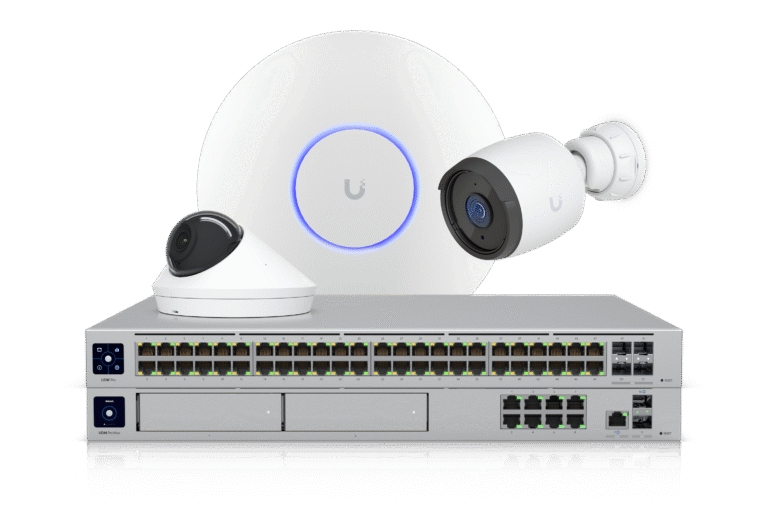
UniFi networking and security equipment

In practice · Rasch Vin & Spiritus

Growth up front.
A foundation behind it.

At Rasch, networking and physical security formed part of the work supporting a growing digital business. We installed a UniFi network and a Protect-based security system around their valuable stock.

A practical example of how the webshop, workplace and physical premises need to work together.

Explore the Rasch case

What interrupts
your workday?

Tell us what is getting in the way. We can start with one specific challenge and work out what needs to connect better.

Talk to us about your IT